Delete your account – Quran Memorizer
App: Quran Memorizer (as listed on Google Play). Use this page to understand how to remove your account and associated data.
This page is for users of Quran Memorizer. We respect your privacy. The app uses Firebase Authentication (anonymous sign-in) and an in-app username; there is no email or password login. Below we explain how to request deletion of your account and data.
How to delete your account (in the app)
The primary way to delete your account and app-held data is inside the app (this verifies you are the user without a password).
- Open the Quran Memorizer app on your device.
- Go to Settings using the bottom navigation bar (tap the Settings tab).
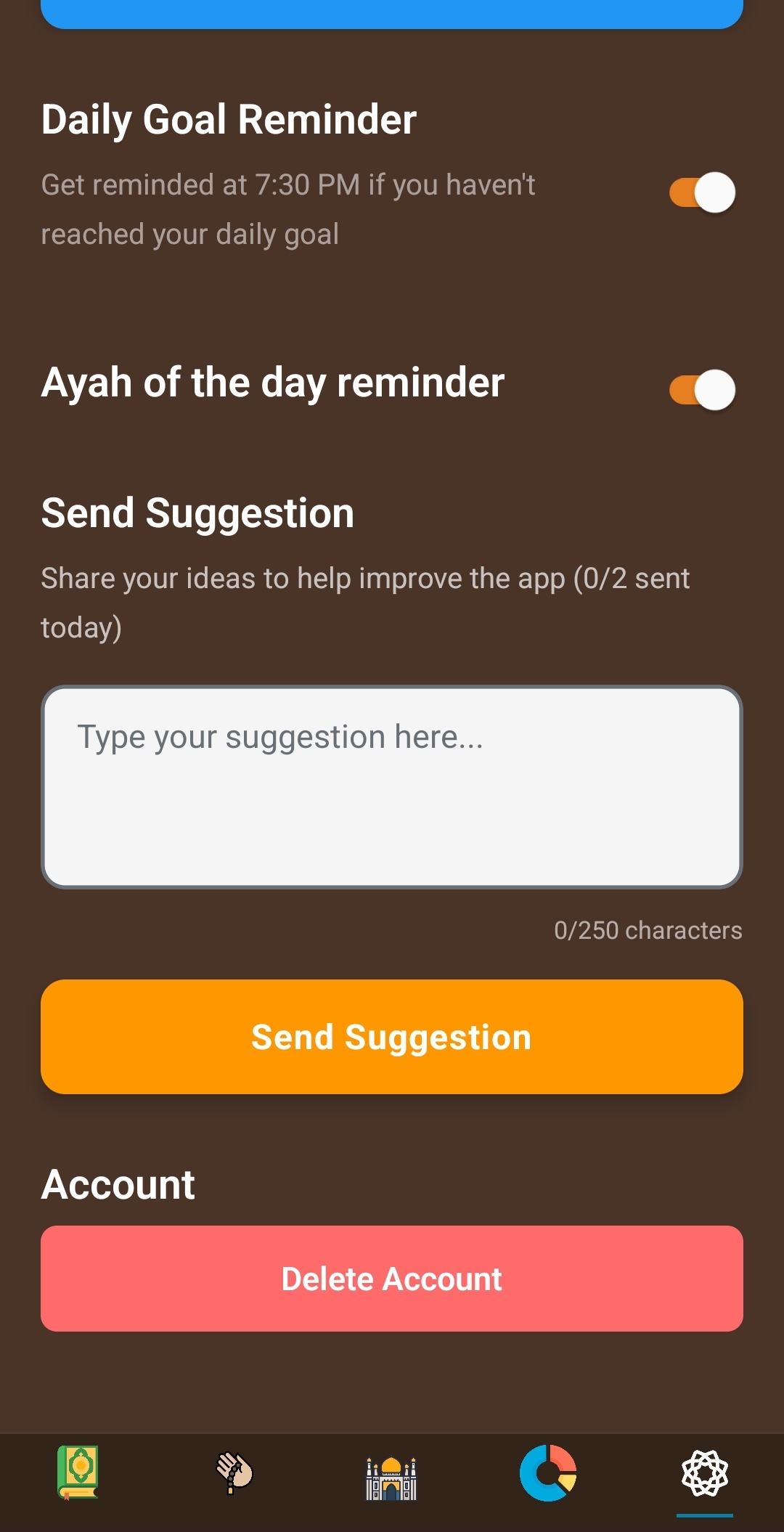
- Scroll to the Account section and tap Delete Account.
- Confirm when prompted to complete deletion.
Deleting the app from your device also removes local data tied to your installation. For server-side data tied to your anonymous account, use the in-app deletion flow or contact us as described below.
What we delete
When you complete account or data deletion in the app, we remove data we hold for that user, which typically includes:
- Your Firebase anonymous authentication user record (account identifier).
- Your username or display name associated with that account.
- Learning progress, memorization state, and preferences stored under your user ID.
- Other user-specific data stored in our backend (for example Firebase) under your user ID.
Only categories that actually apply to your account are removed; the list above reflects how the app stores data for signed-in users.
What we may retain
We do not use your deleted account data for ongoing product features after deletion. The following may still apply in limited cases:
- Legal requirements: We may retain certain information where required by applicable law.
- Security and abuse prevention: Short-term technical or security logs may be kept for a limited period as needed to protect our services.
- Third-party services: Firebase, Google Analytics, and Crashlytics may retain aggregated or technical data under their own policies (for example device or usage analytics that are not tied to your identity in a way that identifies you). See Google’s privacy documentation for those products.
We do not retain your personal account content for ordinary use after you have successfully deleted your account through the in-app process, except as noted above.
If you cannot use the app
If you cannot open the app or complete deletion in Settings, email us at the address below with a brief description of your request. We aim to process verified requests within 30 business days.
Contact and privacy policy
For account deletion requests, privacy questions, or help:
Email: Adamhujair190899@gmail.com
Our full Privacy Policy has additional detail. This deletion page is provided for Google Play and users and should be read together with our Data safety disclosures.
Last updated: April 7, 2026